An empathy and awareness tool that simulates how Dyslexia, Irlen
Syndrome, Low Vision, and other reading disorders can make text
feel, and how colour blindness changes what an image shows. It
recreates a few of the experiences people have described — so you can
feel the effort for a moment. Use the controls to change what
happens.
Please read this first. Dyslexia is neurological and
differs from person to person. It is not literally
“moving letters” for everyone, and this is not a diagnostic
tool or a medical model. Several of these effects also overlap with
Irlen Syndrome (also called scotopic sensitivity or
visual stress) — a perceptual processing difference, distinct from
dyslexia, in which text can appear to blur, swirl, double, or move, and
which is often eased by colored overlays or tinted lenses.
Low vision readers report some of these experiences
too — Letter fragments, Blur / focus drift, and
Crowding among them — and some ease them with prescription
glasses. It is a simulation of some commonly described visual
experiences, meant to build empathy — nothing more.
The reading demo
The text below is real and unchanged for screen readers. The effect
you see is purely visual. Press
Esc at any time, or use the reveal control, to see the
original instantly.
A friend who has dyslexia described to me how she experiences
reading. She can read, but it takes a lot of concentration, and
the letters seem to jump around.
I remembered reading about typoglycemia — the effect where you
can still read a word even when its inner letters are scrambled,
as long as the first and last letters stay in place. Wouldn’t
it be possible to do that interactively, on a website, with
JavaScript? Sure it would.
Dyslexia is characterized by difficulty with learning to read
fluently and with accurate comprehension despite normal
intelligence. This includes difficulty with phonological
awareness, phonological decoding, processing speed, orthographic
coding, auditory short-term memory, language skills and verbal
comprehension, and rapid naming.
Developmental reading disorder is the most common learning
disability. Dyslexia is the most recognized of reading disorders,
however not all reading disorders are linked to dyslexia.
Some see dyslexia as distinct from reading difficulties resulting
from other causes, such as a non-neurological deficiency with
vision or hearing, or from poor or inadequate reading
instruction. It is considered a receptive language-based learning
disability, and it can also affect a person’s expressive
language skills.
Math content
Applied to math, the scramble garbles the words but leaves the
equation itself intact. Perception, Visual wobble, and Blur /
focus drift are available for math content too. Crowding, Jumping
letters, and Letter fragments are not — they would wreck an
equation rather than simulate reading one.
The equation is rendered by MathJax 2.7.7 with
SVG output. That is the version
Canvas LMS ships, so an equation authored for a
Canvas course behaves here exactly as it does there. Drawing each
character as a vector path also means stretchy delimiters — the
tall brace below — come out as one continuous curve instead of
the stacked font pieces a text-based renderer has to fall back on.
1MathJax 2.7.7, SVG output — the simulated
demo. Right-click the equation (or press Shift +
F10) to open MathJax’s own menu, where the
renderer, the zoom and the assistive MathML can all be
changed.
Screen readers. MathJax leaves a real MathML copy
of the equation in the accessibility tree and hides the SVG from
assistive technology, so the maths can be read and stepped through
rather than skipped. NVDA and
Narrator come bundled with
MathCAT, which can interact with STEM content — LaTeX, KaTeX, and
SMILES
chemical notation among them. JAWS requires
MathCAT before it can read the
subscripts and superscripts inside an equation —
the parts written with _ and ^ in LaTeX.
Any user can walk an equation character by character, and
capitalization is announced by an audio tone or a shift in pitch,
set in the screen reader’s own settings. General
text-to-speech, by contrast, reads the words and Greek letters but
not the math symbols. If an equation is ever served as a bare SVG
with no MathML behind it, it is unreadable — right-click it (or
press Shift + F10) and choose
Math Settings → Math Renderer → HTML-CSS
so it can be read.
The same equation, other renderers
The identical equation twice more. The MathML panel is
simulated too, so the same effects can be watched landing in a
second renderer; the MathJax 4 panel is left clean as a straight
reference. Both MathJax versions really are running in this one
page. Turn the simulation off, or press Esc, to
compare all three cleanly — the left brace of the array is the
thing to watch.
2Native MathMLPlain markup in this page, laid out by your browser’s
own MathML engine — no renderer involved. Here the visible
characters and the ones a screen reader announces are the
same nodes, so the simulation works on a copy and leaves the
real equation in the accessibility tree.
3MathJax 4, CommonHTML outputThe current MathJax, laying the equation out as styled HTML
rather than vector paths. Shown unsimulated, as a reference.
It shares this page with the 2.7.7 above; both versions are
loaded at once.
Data table
Every effect runs on this table too — the headers, group names, Greek
letters, dates, times, numbers, and email addresses are all simulated.
Nothing here is left alone.
It also makes the case for accessible marketing.
Outreach leans on dates, times, phone numbers, and email addresses —
content that reaches everyone only when it stays real, selectable text.
See the difference for yourself: let your screen reader or
text-to-speech read this table, then try the same details saved as an
image. Only one of them will read aloud.
Fictional directory of Greek-letter groups, with their uppercase
and lowercase Greek letters, a date, a time, a fictional 800
number, and an email contact.
Dataset
Uppercase Greek letter
Lowercase Greek letter
Date
Time
Fictional 800 number
Company connection
Alpha Group
Α
α
03/14/1993
9:15 AM
1-800-555-1234
contact@alphagroup.com
Beta Group
Β
β
11/22/1993
10:30 AM
1-800-555-2487
help@betagroup.org
Gamma Group
Γ
γ
05/18/1994
1:45 PM
1-800-555-3921
support@gammagroup.edu
Delta Group
Δ
δ
09/07/1994
3:20 PM
1-800-555-4768
holla@deltagroup.com
Epsilon Group
Ε
ε
01/26/1995
8:05 AM
1-800-555-5893
csupport@epsilongroup.org
Zeta Group
Ζ
ζ
06/11/1995
11:10 AM
1-800-555-6712
contact@zetagroup.edu
Eta Group
Η
η
07/22/1996
2:40 PM
1-800-555-7349
help@etagroup.com
Theta Group
Θ
θ
12/09/1996
4:55 PM
1-800-555-8465
support@thetagroup.org
Iota Group
Ι
ι
09/13/1997
9:50 AM
1-800-555-9582
holla@iotagroup.edu
Kappa Group
Κ
κ
04/28/1998
12:25 PM
1-800-555-2196
csupport@kappagroup.com
Lambda Group
Λ
λ
11/04/1998
5:10 PM
1-800-555-3674
contact@lambdagroup.org
Mu Group
Μ
μ
02/16/1999
8:35 AM
1-800-555-4289
help@mugroup.edu
Nu Group
Ν
ν
03/29/2000
10:05 AM
1-800-555-5126
support@nugroup.com
Xi Group
Ξ
ξ
08/21/2000
1:15 PM
1-800-555-6048
holla@xigroup.org
Omicron Group
Ο
ο
05/06/2001
3:45 PM
1-800-555-7291
csupport@omicrongroup.edu
Pi Group
Π
π
10/19/2001
11:35 AM
1-800-555-8357
contact@pigroup.com
Rho Group
Ρ
ρ
07/03/2002
2:05 PM
1-800-555-9463
help@rhogroup.org
Sigma Group
Σ
σ / ς
12/27/2002
4:15 PM
1-800-555-1842
support@sigmagroup.edu
Tau Group
Τ
τ
09/30/2003
9:25 AM
1-800-555-2975
holla@taugroup.com
Upsilon Group
Υ
υ
04/12/2004
12:50 PM
1-800-555-3869
csupport@upsilongroup.org
Phi Group
Φ
φ
11/23/2005
3:05 PM
1-800-555-5418
contact@phigroup.edu
Chi Group
Χ
χ
06/08/2006
10:40 AM
1-800-555-6784
help@chigroup.com
Psi Group
Ψ
ψ
01/17/2007
1:30 PM
1-800-555-7936
support@psigroup.org
Omega Group
Ω
ω
02/24/2008
5:25 PM
1-800-555-9876
holla@omegagroup.edu
A caution for screen-reader testing. While the
simulation is running, the visual effects rewrite the table cells and
screen readers do not read the table correctly. Turn
Simulation on off, or use Reveal original
text, before testing it. With the demo off, the Greek columns
are a useful test on their own: pronunciation varies from one engine
to the next, so check your screen reader or text-to-speech voice
(VoiceOver included) against the uppercase and lowercase letters to
confirm which are spoken aloud.
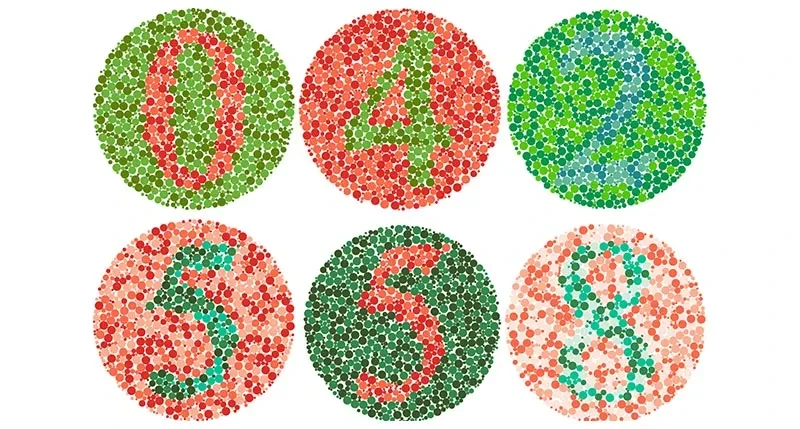
Colour vision
About 1 in 12 men and 1 in 200 women have a colour vision deficiency.
Choose one below and these three images are re-rendered the way that
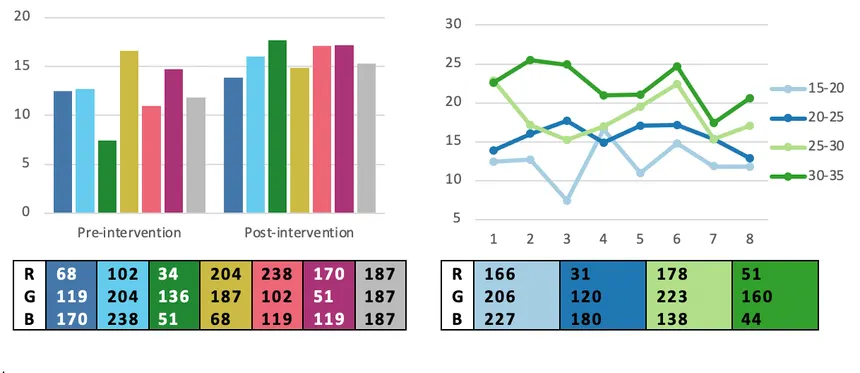
person is estimated to see them. Notice what disappears: the hidden
numbers, the difference between chart series, and which team is which.
Each i button explains the condition.
“Simulation on” must be ticked in the controls for
these filters to apply, and the reveal control suspends them too —
both switch the whole page back to its original state, images
included. The status line below always says which you are looking at.
Showing the original images.
Ishihara plates. The digits depend entirely on
red–green contrast, so they vanish for protanopia and deuteranopia.
Charts that rely on colour alone. With no labels,
patterns, or shapes, the series become indistinguishable.
Red versus green. The 2015 “Color Rush” game
many red–green colour-blind viewers could not follow.
The filters are the Machado, Oliveira and Fernandes (2009)
full-severity models. Real colour vision deficiencies vary in degree,
so treat these as an estimate rather than a measurement.
Take it to any page
Victor Widell, who built the original demo, suggested turning it into a
bookmarklet but never did — so here is that one, and a second for
colour vision. Drag either to your bookmarks bar.
Reading
Applies only the original Letter scramble, not the
other effects on this page, which can’t be applied safely to
arbitrary sites.
Colour vision
Filters any page through the same matrices this one uses, so you
can check a real site for information carried by colour alone.
Credits & sources
Original concept and letter-scramble demo:
Victor Widell, “Dsxyliea” (2016). This project is a fork that ports his idea to TypeScript and adds
new modes.